

Medicare Removing Access to MBI Lookup Tool Due to Unverified Use: What Practices Should Do Now
Medicare removing access to the MBI lookup tool due to unverified use is a CMS monitoring step, not a blanket shutdown. CMS compares the Medicare Beneficiary Identifiers each portal user searches against claims under linked NPIs. Users with many lookups and few matching claims may lose access, so practices should link users to NPIs and search only billable patients.
A front-desk user opens the portal on Monday and the MBI lookup tab reports that access has been removed. Medicare Administrative Contractor (MAC) portals, including the Noridian Medicare Portal, now carry a notice that CMS applies enhanced monitoring to the MBI lookup tool after thieves began using stolen identifiers for Medicare fraud. This guide explains what CMS actually said, what makes a lookup look unverified, how to keep portal user access, and what to do if it is lost. A ten-question self-assessment checklist near the end shows where your practice stands.
MBI Lookup Controls: The Numbers to Watch
Seven figures cover most of what a practice needs to monitor. Only some come from CMS or a MAC. The rest are practical internal targets, because CMS has not published a numeric lookup threshold. Review them monthly in one meeting so each number has a named owner.
Key numbers cheat sheet
| Metric | Practical target/range | Review frequency | Source type |
| Characters in one MBI | 11 (letters S, L, O, I, B, Z never appear) | At data entry | A: CMS definition |
| Portal users linked to an organizational NPI | 100% of users who run lookups | Monthly | A: CMS requirement (May 7, 2026 date) |
| Lookups followed by a Medicare claim within 30 days | 90% or higher | Monthly, by user | P: practical internal target |
| Lookups per Medicare encounter | A small share; investigate a month that doubles | Monthly | P: practical internal target |
| Lookups per patient | One; review any repeat search | Weekly | P: practical internal target |
| Portal user access review | Monthly, plus every role change | Monthly | P: practical internal target |
| Medicare claim filing window | 12 months from date of service | Per claim | A: published Medicare rule (MAC guidance) |
Source labels: A = published CMS or MAC requirement or definition. P = practical target set as an internal control; not a CMS threshold. Targets marked P are starting points to adjust for your specialty and patient mix.
Is Medicare Removing Access to the MBI Lookup Tool Due to Unverified Use?
Not for everyone. CMS announced enhanced monitoring of MAC MBI lookup tools on February 26, 2026, and warned that access may be removed from users with an unusually high rate of lookups without associated claims, per the CMS MLN Connects newsletter for that date. The notice is conditional. CMS has not published a numeric threshold, and the sources reviewed describe no blanket removal.
CMS gave two instructions. First, use the MAC lookup tool only for people the practice intends to serve and bill to Medicare. Second, make sure each portal user is associated with the NPIs of the organization for which that user searches. Associating users with NPIs, called NPI association here, had a CMS completion date of May 7, 2026, which has passed. Practices that skipped it should treat it as overdue.
The notice follows earlier steps. In December 2024, CMS asked for public input on MBI lookup tools, citing people who target MBIs to commit fraud, and asked about restricting tools run outside CMS and the MACs; comments were due February 17, 2025, per the CMS MLN Connects newsletter of December 19, 2024. That history shows MBI theft has been a policy concern for more than a year.
Timeline of CMS actions on MBI lookup tools
| Date | What happened | Source type |
| Dec 19, 2024 | CMS MLN item requests input on MBI lookup tools and MBI theft; comments due Feb 17, 2025 | A: CMS notice |
| Feb 26, 2026 | CMS MLN item announces enhanced monitoring of MAC MBI lookup tools | A: CMS notice |
| Mar 1, 2026 | American Podiatric Medical Association relays the alert to members | S: association report |
| Mar 17, 2026 | Hospice News reports the oversight, framed around hospice fraud | S: trade report |
| May 7, 2026 | CMS date to finish associating portal users with NPIs | A: CMS notice |
A = published CMS requirement. S = secondary report relaying the CMS notice.
How Does the MBI Lookup Tool Work, and Who May Use It?
The MBI lookup tool is a secure MAC portal feature that returns a patient’s Medicare Beneficiary Identifier (MBI) when the patient cannot supply it. Staff log in, enter the patient’s first name, last name, date of birth and Social Security number, and pass a bot check. If the details match, the MBI appears; if not, the portal reports that it could not be located, as the Noridian MBI Lookup Inquiry page describes.
MACs set the intended use narrowly. CGS states the tool is for use only when a Medicare patient does not or cannot give the MBI. First Coast’s SPOT guide adds that users must follow the HETS Rules of Behavior, and that violations may lead to referral of the organization for investigation. The same guide says HETS is not for checking Medicare Advantage or Part D plan coverage.
What an MBI looks like
An MBI has 11 characters made of digits and uppercase letters, with S, L, O, I, B and Z excluded. CMS guidance says the hyphens printed on the card are not part of the number and are not entered in systems. Each MBI is randomly generated and carries no embedded meaning. A format check at data entry catches typos before they become rejections, which supports a healthy claim rejection rate.
What Makes a Lookup Look Unverified to a Reviewer?
A lookup looks unverified when no billed Medicare service follows it, because the CMS check matches searched MBIs against claims filed under NPIs. That is the practical meaning of unverified use: a search with no billing trail behind it. Five habits create that gap, and each is fixable when the condition below applies.
CMS
- Shared logins. When several staff use one login, activity cannot be tied to a person or an NPI. Give each user a named login.
- Searches before a visit exists. When a caller asks whether the practice takes Medicare and staff search at once, no claim will follow. Search only after scheduling.
- Patients on other coverage. When a patient over 65 turns out to have Medicare Advantage or commercial coverage, the claim goes to a plan, not the MAC. Confirm coverage type first.
- Repeat searches on one patient. When a first search fails, correct the name or date of birth instead of retrying. Ask the patient for the card.
- Bulk or list searching. Never search lists of people. The tool is for individual patients the practice will serve.
In billing audits, a common pattern is front-desk staff searching at the first phone call, weeks before an appointment exists. Another is a shared login created years ago for “the front desk” that stays active after three staff changes. A third is searches for patients over 65 who later prove to have Medicare Advantage, so the claim never reaches the MAC.
CMS has not defined “unusually high,” so treat the ratio of lookups to claims as a trend to manage, not a line to approach. A written medical billing compliance checklist should include portal access logging, because a record of who searched and why is the evidence that answers a monitoring question.

How Do You Keep MBI Lookup Access? A Seven-Step Process
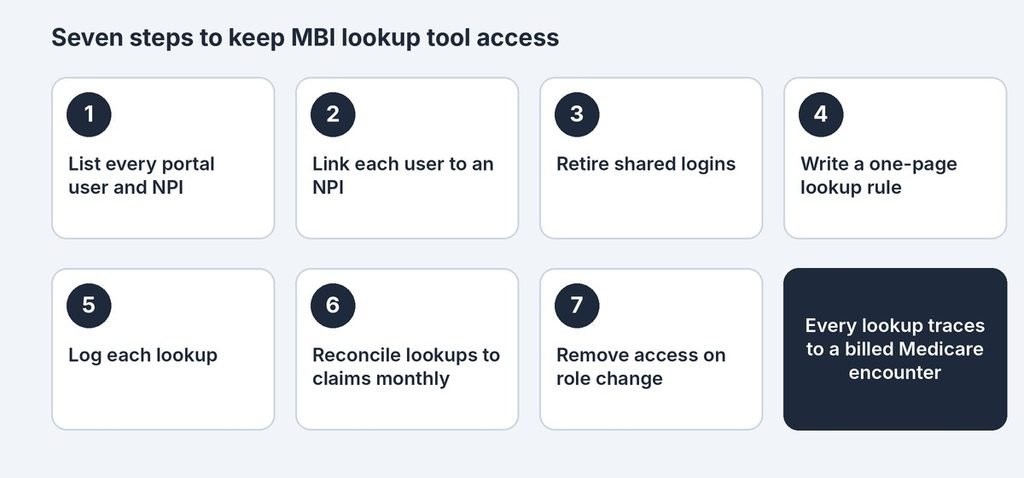
Practices keep access by tying every portal user to an NPI and every lookup to a billed Medicare encounter. Seven steps make that repeatable, and each carries a condition. Steps one through three fix who can search; steps four through seven govern when and why.
- List every portal user and the NPIs each supports. Do this first, especially when more than one person holds a login.
- Associate each user with the right NPIs in the MAC portal. Do this for any user not yet linked. Steps differ by MAC, so check your MAC’s portal guide or ask your portal administrator.
- Retire shared logins. Do this whenever one login is used by more than one person.
- Write a one-page lookup rule. Allow a search only when the patient cannot give the MBI, Original Medicare billing is expected, and an appointment exists or the patient is present.
- Log each lookup. Record the date, user and appointment or encounter ID. Keep Social Security numbers out of the log, in line with HIPAA-compliant billing practices.
- Reconcile monthly. Match lookups to claims and review any user below your internal target. This fits the registration stage of the revenue cycle workflow.
- Change access the same day roles change. Remove departed staff immediately and review all users quarterly.
When monthly reconciliation shows gaps that staff cannot close, outside medical billing services can take over front-end checks. Practices without a lookup-to-claim report often add one through reporting and analytics support, since a spreadsheet match is hard to sustain across several users and payers.
Which Payers Does This Affect? Medicare, Medicare Advantage, Medicaid and Commercial
The lookup tool matters most for Original Medicare, because its claims go to the MAC and carry the MBI. Other payers use their own identifiers, so a lookup for those patients has no matching MAC claim. Reviewing payer-specific claim submission rules for each plan prevents the mismatch.
Illustrative payer comparison (actual rules vary; confirm with each payer)
| Payer type | Identifier used for claims | MAC MBI lookup applies? | Practical note |
| Original Medicare (fee-for-service) | MBI | Yes, through the MAC portal | Link users to NPIs; log each lookup |
| Medicare Advantage | Plan-issued member ID | No; claims go to the plan | Confirm coverage type before searching |
| Medicaid | State Medicaid ID | No; use the state eligibility channel | Dual-eligible patients still need the MBI for Medicare |
| Commercial | Plan member ID | No | Age 65 or older does not prove Medicare; run eligibility first |
Illustrative: a summary for planning. Actual identifier rules and portals vary by plan and state. The HETS guidance cited above excludes Medicare Advantage and Part D plan eligibility checks.
Four Worked Examples for Measuring Lookup Health
Four calculations show whether lookup activity is defensible. Each uses an illustrative scenario, so replace the numbers with your own portal and claim data. The match rate comes first because it is closest to what CMS describes. Use the same formulas every month so trends stay comparable.
Example 1: lookup-to-claim match rate
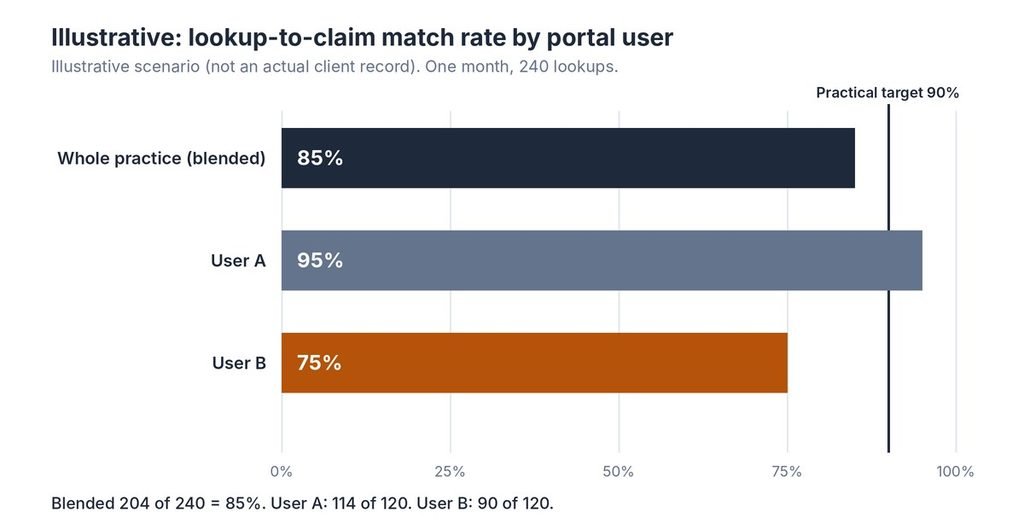
Formula: lookups followed by a Medicare claim within 30 days ÷ total lookups. The 30-day window is a practical internal choice, not a CMS rule. Illustrative scenario (not an actual client record): a practice runs 240 lookups in a month, and 204 are followed by a claim, so the blended rate is 85%.
Illustrative-match rate by user
| User | Lookups | Followed by a claim | Match rate |
| User A | 120 | 114 | 95% |
| User B | 120 | 90 | 75% |
| Practice (blended) | 240 | 204 | 85% |
Illustrative: not actual client data. 114 + 90 = 204 matched lookups.
The blended 85% looks only slightly low, yet User B sits 15 points under the 90% practical target while User A is above it. Do this when a blended rate misses the target: split by user before retraining everyone. Unmatched lookups can be legitimate, such as cancellations, so review the reasons.
Example 2: lookup rate per Medicare encounter
Formula: lookups ÷ Medicare encounters in the same month. Illustrative scenario (not an actual client record): 60 lookups across 1,000 Medicare encounters is 6%. If the next month shows 150 lookups across 1,000 encounters, the rate is 15%, or 2.5 times higher. Investigate causes first. New staff, a wave of reissued MBIs or a registration change can raise lookups without any misuse.
Example 3: unlinked-user rate
Formula: portal users not linked to an NPI ÷ total portal users. Illustrative scenario (not an actual client record): 3 unlinked users among 12 is 25%. The target is 0% for anyone who runs lookups, because linkage is the one control CMS named directly. Fix this rate before adjusting anything else.
Example 4: cash delayed when an MBI cannot be found
Formula: encounters without a usable MBI at registration × average allowed amount per claim. Illustrative scenario (not an actual client record): 80 encounters × $110 = $8,800 of delayed cash per month. The claims are delayed rather than lost. The larger risk is crossing the Medicare timely filing limit, so use a method to track timely filing deadlines for every unresolved account.
How to use these numbers correctly
Compare like for like: one user against that user’s earlier months, or a new-patient clinic against another new-patient clinic. A missed benchmark is a signal to investigate, not a verdict. Seasonal coverage changes, new staff and CMS reissuing MBIs can all move lookup counts, so record the reason beside any unusual month.
What If Access Is Removed? Backup Ways to Get an MBI
Practices that lose access can still obtain an MBI by asking the patient, using HETS-based eligibility checks, or contacting the MAC. CGS guidance says patients without a new card can get the number through 1-800-MEDICARE or their Medicare.gov account, and that eligibility can be checked through the portal, a billing agency, a clearinghouse, a software vendor or HETS.
Watch for the AAA 72 error on an eligibility response. CMS provider guidance says it may mean the patient’s MBI has changed, and a historic eligibility search then shows the old MBI’s termination date. For dates of service before the change date, either the old or new MBI works on a fee-for-service claim. For dates entirely on or after it, use the new MBI.
Be careful with third-party lookup tools. Experian Health’s 2023 blog says its optional lookup finds active MBIs in about 60% of cases on average, a vendor-reported figure. CMS asked in 2024 about restricting externally controlled tools, so availability may change. Never enter patient identifiers into a site that is not your MAC portal or a vendor covered by a business associate agreement.
The sources reviewed do not describe a standard reinstatement process. Ask your MAC’s portal support what review applies, and document your corrective steps first: linked users, a written lookup rule and monthly reconciliation. Separately, Ritter Insurance Marketing reported in March 2026 that CMS told plans about roughly 1.3 million MBI reassignments, with no reason given. More reissued MBIs can mean more legitimate lookups, so log the reason.
How Long Does It Take to Bring Lookup Controls Under Control?
Most practices can finish the linking work quickly and need a few months to show a stable pattern. These are planning ranges, not guarantees, and they depend on MAC portal turnaround and staff size. Smaller practices with one or two portal users often finish sooner.
- Linking users and retiring shared logins: commonly days to about two weeks, depending on how fast the portal administrator acts.
- Written lookup rule and logging in place: about two to four weeks.
- First meaningful reconciliation: after one full month of logged data.
- Stable, explainable match rate: often two to three months of consistent logging.
Common Mistakes and How to Avoid Them
Six mistakes account for most avoidable lookup problems, and each has a simple fix once the triggering condition is recognized. Review the list against your own front-desk habits, not against an ideal workflow.
- Using the tool as a general eligibility check. When only coverage status is needed, use an eligibility transaction instead.
- Storing Social Security numbers in notes or spreadsheets. When logging, keep only the encounter or appointment ID.
- Leaving departed staff active. When anyone leaves, remove access the same day.
- Retrying after an AAA 72 response. When an MBI is rejected as invalid, ask for the new card before searching again.
- Treating May 7, 2026 as a one-time task. When staff or NPIs change, repeat the association and review users quarterly.
- Ignoring the downstream effect on denials. Wrong MBIs feed rework, so tie lookup fixes to your plan to reduce claim denials.
Quick Summary
The recap below uses the same practical-target language as the rest of the guide, so each point can be checked against the numbers above.
- CMS has said access may be removed, not that it has been removed for everyone.
- A practical target is every portal user linked to an NPI, with no shared logins.
- A practical target is 90% or more of lookups followed by a Medicare claim within 30 days.
- Investigate any month where lookups per Medicare encounter roughly doubles.
- Use backup routes (patient, HETS-based eligibility, the MAC) if access is lost.
- The 12-month Medicare filing window is a published rule; the lookup targets are internal.
Self-Assessment Checklist: Is Your Practice Ready?
Answer yes or no to each question below, then count your yes answers and compare the total with the scoring guide that follows. Complete it with the person who administers portal access.
- Is every portal user who runs lookups linked to an organizational NPI?
- Does each person have a named login, with no shared credentials?
- Do you have a written one-page rule for when staff may run a lookup?
- Do you log each lookup with the user and an appointment or encounter ID?
- Are Social Security numbers kept out of the lookup log?
- Is 90% or more of your lookups followed by a Medicare claim within 30 days?
- Do you review lookups per Medicare encounter every month?
- Do you remove access the same day staff leave or change roles?
- Do staff know to ask for the card and use eligibility checks before searching?
- Do you track the 12-month Medicare filing deadline for accounts with a missing MBI?
Scoring guide
| Yes answers | What it suggests |
| 9-10 | Controls look solid. Keep monthly reconciliation and review users quarterly. |
| 6-8 | Gaps exist. Close unlinked users, shared logins and missing logs first. |
| 0-5 | High risk of unverified lookups. Fix linkage now and consider outside support. |
Illustrative scoring guide for self-review; not a CMS audit standard.
When Should a Practice Consider Professional Support?
In-house handling has reached its limit when any of these signals appear. One signal may be a passing problem; several together usually mean the process needs outside structure. Judge them against your own lookup log, not impressions:
- Lookups regularly exceed what the Medicare schedule explains, and no one can say why.
- More than one person still shares a portal login and no administrator owns access.
- Rejections for invalid MBIs repeat each month, a sign the clean claim rate is slipping.
- Accounts with a missing MBI are approaching the 12-month filing window.
- Staff turnover leaves no one trained on portal rules.
When evaluating outside help, look for a US-based team, written access controls, a monthly report that matches lookups to claims, and clear pricing. Compare the cost of support against the staff time you spend today; the outsourced medical billing vs in-house decision deserves a fresh look.
EON MED SOLUTIONS is one example of that model. Its US-based team provides end-to-end billing, coding, credentialing, denial management and compliance support, with transparent reporting. The team describes its work as process, not guaranteed outcomes, and results vary by practice. Practices can review the EON MED SOLUTIONS billing and RCM services to see which parts fit.
Expert Opinion
Medicare removing access to the MBI lookup tool due to unverified use is a conditional risk. It becomes real when lookups stop matching claims or users are not linked to NPIs. Both problems are visible in your own logs, so a practice can find them before a MAC does.
Some points here are firm. The CMS notice, the May 7, 2026 date, the MBI format and the 12-month Medicare filing window are published requirements. The 90% match rate, the monthly review cycle and the doubling flag are practical internal targets, and the worked examples are illustrative scenarios.
The natural next question is which of your portal users could lose access first. Start with the unlinked ones, then match last month’s lookups to claims. If that review exposes gaps, see how EON MED SOLUTIONS can support your billing and RCM workflow.
Frequently Asked Questions
These answers draw on the CMS notice, MAC guidance and worked examples cited earlier. Targets labeled practical are internal controls, not CMS thresholds.
What is the Medicare MBI lookup tool?
The MBI lookup tool is a secure feature in a Medicare Administrative Contractor portal. It returns a patient’s Medicare Beneficiary Identifier when the patient cannot provide it. Staff enter the patient’s name, date of birth and Social Security number. CMS intends it only for patients a practice will serve and bill to Medicare.
Is Medicare removing MBI lookup tool access for all providers?
No. CMS announced enhanced monitoring on February 26, 2026, and said access may be removed for users with an unusually high rate of lookups without associated claims. The sources reviewed describe no blanket removal. Practices lower their risk by linking portal users to NPIs and searching only patients they will bill.
What is a good lookup-to-claim match rate?
CMS has published no numeric target. A practical internal target is 90% or higher of lookups followed by a Medicare claim within 30 days, reviewed monthly by user. Cancellations and patients with other coverage explain some gaps, so investigate a miss instead of treating it as a violation.
What is a good number of MBI lookups per month?
No CMS number exists. Track lookups as a share of Medicare encounters instead of a raw count. A small share is typical because most patients present a card. A practical rule is to investigate any month where the rate roughly doubles, then record the cause.
How do you link portal users to NPIs?
The exact steps depend on your MAC’s portal. Check your MAC’s portal guide, or ask the person who administers portal access for your organization. CMS asked practices to finish this by May 7, 2026, so confirm today that every user who runs lookups is linked.
What should a practice do if lookup access is removed?
Ask patients for their Medicare card, use eligibility checks through a clearinghouse or billing agency, and contact the MAC’s portal support about review steps. Document corrective actions first. Track the 12-month filing window for any account that is waiting on an MBI.
Sources and Methodology
(a) Published standards and definitions from named bodies
- CMS, MLN Connects Newsletter, February 26, 2026 (enhanced monitoring of MAC MBI lookup tools; May 7 date).
- CMS, MLN Connects Newsletter, December 19, 2024 (request for input on MBI lookup tools; comments due February 17, 2025).
- CMS, “Understanding the MBI” guidance (11-character format, excluded letters, hyphens). https://www.hhs.gov/guidance/sites/default/files/hhs-guidance-documents/Understanding-the-MBI-052918.pdf
- CMS, “What do Medicare Beneficiary Identifiers (MBIs) mean for health care providers & office managers?” (AAA 72 error; old and new MBI use on claims). https://www.cms.gov/Medicare/New-Medicare-Card/Providers/Providers.html
- Noridian Healthcare Solutions, MBI Lookup Inquiry, Portal Guide. https://med.noridianmedicare.com/web/portalguide/inquiry-guide/eligibility/mbi-lookup
- CGS Administrators, Medicare Beneficiary Identifier page. https://www.cgsmedicare.com/jb/claims/mbi.html
- First Coast Service Options, SPOT User Guide, Section 4: MBI Lookup (HETS Rules of Behavior). https://medicare.fcso.com/user-guides/spot-user-guide-section-4
- Palmetto GBA, Medicare’s Claim Timeliness Requirements and Criteria for a Timeliness Extension (12-month rule). https://www.dmepdac.com/palmetto/jma.nsf/DID/AWNPNM6234
(b) Named benchmarking data providers
No benchmarking data provider figures are used. CMS has published no numeric lookup benchmark.
(c) Practical or illustrative targets
The 90% match rate, 30-day match window, monthly review cycle, doubling flag and timeframe ranges are practical internal targets set by the authors for planning. They are not drawn from a named benchmark. Worked examples and the payer table are illustrative.
(d) Survey, study and secondary report data
- American Podiatric Medical Association, “CMS Alert: MBI Lookup Tool Monitoring,” March 1, 2026.
- Hospice News, “CMS Implements Enhanced Oversight for MAC MBI Lookup Tools,” March 17, 2026.
- Ritter Insurance Marketing, “1.3 Million Medicare Beneficiary Identifiers to Be Reissued in March 2026,” March 11, 2026 (cause not stated by CMS).
- Experian Health blog, “How MBI Lookup tool can help providers post-CMS data breach,” October 10, 2023 (vendor-reported 60% figure).
Methodology: this article draws on web research completed October 16, 2026. Results vary by practice, MAC and payer. Figures and requirements reflect information available at the time of research, and CMS or MAC guidance may change.


