

How to Track Timely Filing Deadlines: A Step-by-Step Guide
To track timely filing deadlines, record each payer’s window and calculate each deadline from the date of service. Review open claims weekly, set alerts before the limit, and keep proof of acceptance. Medicare, for example, allows 12 months from the service date.
A missed filing deadline is permanent, and most teams learn about it from a denial. This guide shows how to track timely filing deadlines. It covers a payer matrix, consistent calculations, staged alerts, and a weekly review rhythm. You will also find worked examples and a benchmark table that labels every figure by source. A short self-check near the end helps you test your own process. It is written for practice owners and billing managers who need a system that works without extra software.
How to Track Timely Filing Deadlines at a Glance?
| Metric | Practical Target/Range | Review Frequency | Primary Source |
| Original Medicare filing window | 12 months from date of service | Every claim | ¹ Published federal standard |
| Commercial and Medicaid filing windows | Set by contract or state; commonly reported 90 days to 12 months | At contract signing | ² Commonly reported range |
| Internal alert stages | 50%, 75%, and 90% of the window elapsed | Weekly | ³ Illustrative target |
| Submission target after service | Within about 7 days | Weekly | ³ Illustrative target |
| Rejection follow-up | Within 2 business days | Daily | ³ Illustrative target |
| Open-claim aging review | All unpaid claims sorted by days since service | Weekly | ³ Illustrative target |
¹ Published federal standard: 42 CFR 424.44 defines the Medicare window. ² Commonly reported range: industry sources differ, so verify each contract or state manual. ³ Illustrative target: a practical planning figure, not a payer requirement.
Start With a Payer Matrix You Trust
Every tracking system depends on one reference document. Build a payer matrix that lists each plan you bill and its filing window. Record how the window is counted, whether by calendar days or months, and which date starts it. Note the weekend rule, the network status that applies, and the source of the figure. Add a “last verified” date, so stale entries stand out. Assign one person to maintain it, and update it whenever a contract or state manual changes.
- Payer and plan, with network status
- Filing window and counting method
- Start date rule, such as From date or Through date
- Weekend and holiday rule, if stated
- Source document and last verified date
Calculate Every Deadline the Same Way
Choose the Anchor Date First
Most disputes start with the wrong anchor date. For Original Medicare, professional claims use the line-item “From” date. Institutional claims with span dates use the “Through” date, according to Noridian’s MAC guidance. Medicare also counts the day the contractor receives the claim, as the CMS Claims Processing Manual explains. Contracts may use other rules, so read the wording. Medicare contractors, including Novitas, publish a timely filing calculator that you can use to double-check your own math. Write the anchor rule into the matrix beside each payer, so staff never guess.
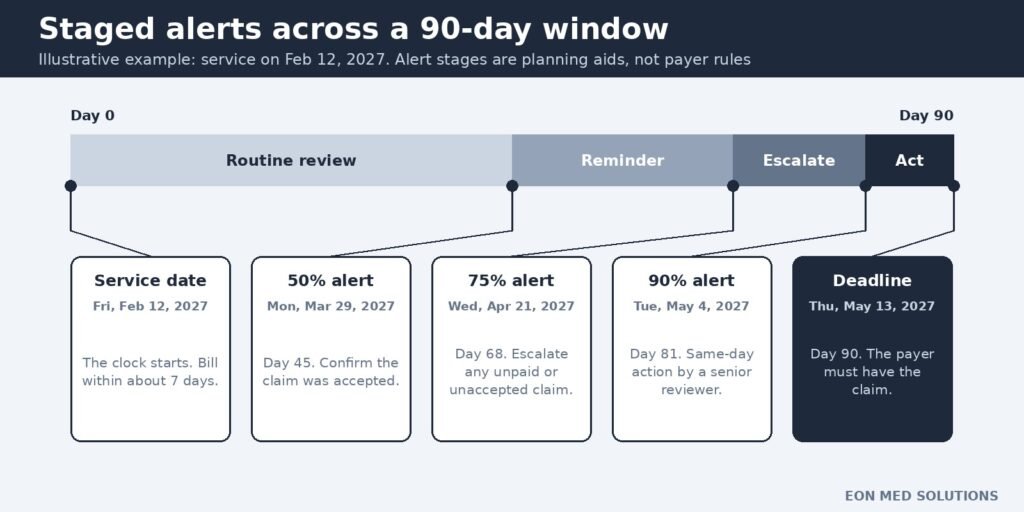
Worked example 1: deadline and alert dates
Formula: Deadline = service date + window; alert date = service date + (window × alert percentage).
A service occurs on February 12, 2027, under a 90-day contract window. The deadline is Thursday, May 13, 2027. Illustrative alerts at 50%, 75%, and 90% fall on March 29, April 21, and May 4. Each alert moves the claim to a more senior reviewer. Repeat the same steps for every payer in the matrix. In a spreadsheet, =A2+90 returns the deadline, and =EDATE(A2,12) handles a 12-month window.
Watch Four Lists, Not One
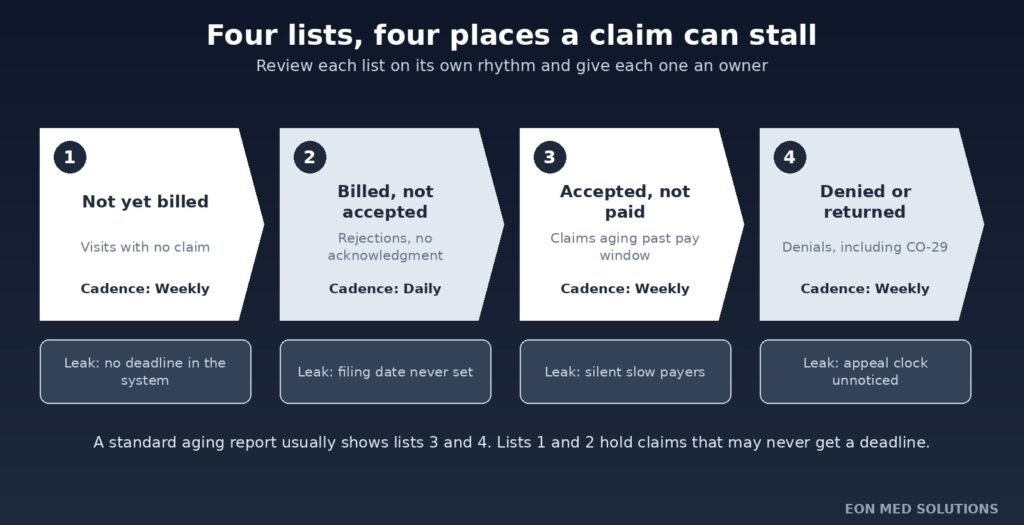
A single aging report misses the biggest leak. Claims that were never billed do not appear on it. Track four lists instead, each with its own owner and review rhythm. The first catches visits without claims. The second catches claims that were sent but never accepted. The third and fourth catch unpaid and denied claims. Structured A/R management follows a similar staged view, and it keeps older balances from hiding behind newer ones. Each list answers a different question, so mixing them hides risk.
| List | What it catches | Cadence | Owner |
| Not yet billed | Visits with no claim on file | Weekly | Charge entry lead |
| Billed, not accepted | Rejections and missing acknowledgments | Daily | Claims specialist |
| Accepted, not paid | Claims aging past the normal pay window | Weekly | A/R follow-up |
| Denied or returned | Denials, including late-filing denials | Weekly | Denial specialist |
How to Track Timely Filing Deadlines With Early Alerts?
Alerts work only if they arrive while a fix is still possible. Knowing how to track timely filing deadlines includes knowing when to warn. Many practice management systems and clearinghouses offer deadline flags, so turn them on before buying anything new. If yours does not, a spreadsheet with a deadline column and color rules works. Use staged alerts as a share of each payer’s window. The first alert reminds, the second escalates, and the third demands action. Reports from a reporting and analytics view make those stages easy to review together.
Worked example 2: percent of window elapsed
Formula: Percent elapsed = days since service ÷ window in days × 100.
Using the February 12, 2027 service, suppose today is April 15, 2027. That is day 62 of a 90-day window. Dividing 62 by 90 gives about 69%. The claim has passed the 50% alert and sits just below the 75% alert. If it is still unaccepted, move it to the front of tomorrow’s queue.
Keep Proof That Each Claim Was Accepted
Submitting a claim and filing it are not always the same thing. A claim that the payer rejects as unprocessable may not establish your filing date. Confirm acceptance for every claim, and save the clearinghouse acknowledgment by payer and date. Retention periods differ by payer contract and state, so follow the longest rule that applies to you. Faster, cleaner submission also reduces rejections, and these electronic claims submission tips explain how to tighten the front end. Keep the acknowledgment where the whole team can find it.
A Weekly Rhythm With Clear Owners
- Daily: work rejected or unaccepted claims, targeting two business days (illustrative).
- Weekly: reconcile the schedule against submitted claims to find unbilled visits.
- Weekly: review open claims by days since service, sorted by payer window.
- Monthly: review submission lag by payer and claim type, then adjust targets.
- After a system or vendor change: audit the last 90 days of open claims.
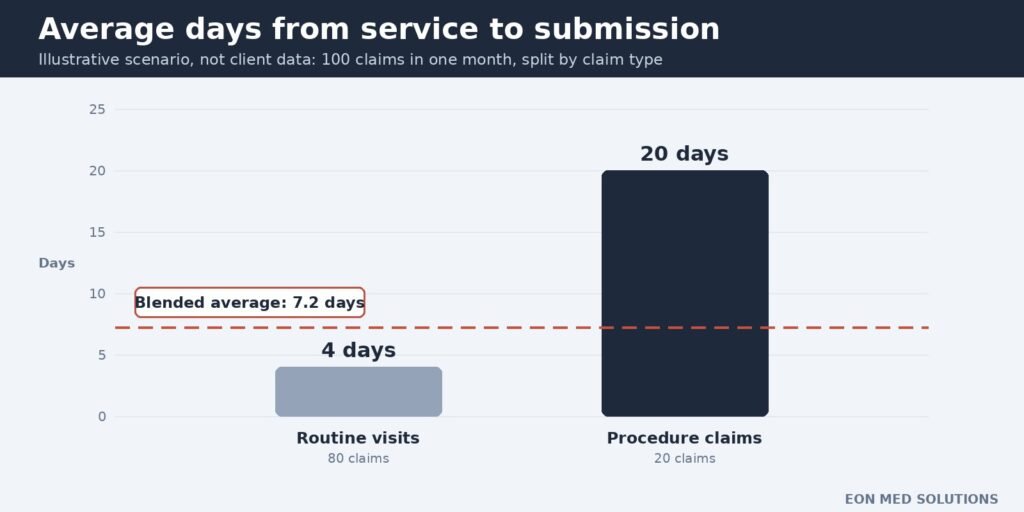
Worked example 3: blended submission lag
Formula: Average lag = total days from service to submission ÷ number of claims.
Illustrative scenario (not an actual client record): a practice submits 100 claims in a month. Eighty routine visits average 4 days, totaling 320 days. Twenty procedure claims average 20 days, totaling 400 days. The blended average is 720 ÷ 100, or 7.2 days, which looks close to a 7-day target. Yet procedure claims take five times longer, and the blend hides the delay.
Using These Benchmarks Like for Like
A benchmark helps only when the comparison is fair. Medicare’s 12-month window is a federal rule, while the alert stages and the 7-day target are planning figures. Compare the same payer, the same claim type, and the same period. Break results out by group before you average them, as the scenario above showed. One missed alert is a signal to look at the workflow, not a verdict on your staff. Start with the group that runs slowest, then find the step that causes it.
How Long a Tracking System Takes to Work?
Illustrative planning ranges only. They are not guarantees, and results vary by practice.
| Fix | Partial Results | Fuller Results | What It Takes | Key Constraint |
| Payer matrix | 1–2 weeks | About 1 month | Gathering contracts and manuals | Locating current agreements |
| Weekly four-list review | 2–4 weeks | 2–3 months | A fixed weekly slot and owners | Staff time |
| Automated staged alerts | 1–2 weeks to configure | 1–3 months to tune | System alert features | Software capability |
The Short Version
- Medicare allows 12 months from the date of service (published federal standard).
- Build one payer matrix, and calculate every deadline from the same anchor date.
- Track four lists, because unbilled visits never appear on an aging report.
- Alert stages at 50%, 75%, and 90% are illustrative, not payer rules.
- Confirm acceptance and keep proof for every claim.
Self-Check: Would Your Tracker Catch a Late Claim?
Answer yes or no to each question, then read the scoring guide below.
- Can you show every payer’s filing window in one document?
- Does that document show a last verified date for each entry?
- Do you reconcile your schedule against claims every week?
- Can you list unpaid claims by days since service in under an hour?
- Do staged alerts fire before 75% of any window has passed?
- Do you confirm acceptance, not just submission, for each claim?
- Do you review submission lag by claim type, not only overall?
- Does one person own the tracker and its updates?
- 7–8 yes: Well protected. Review the system monthly.
- 4–6 yes: Gaps exist. Fix the “no” answers first, starting with questions 1 to 4.
- 0–3 yes: At risk. Build the payer matrix and unbilled-visit report this week.
Expert Opinion
The firm parts of how to track timely filing deadlines are few. Original Medicare allows 12 months from the date of service, and 42 CFR 424.44 defines that window. Everything else is practical or illustrative guidance. That includes the alert stages, the 7-day submission target, the two-day rejection goal, and the improvement timeframes. Commercial and Medicaid windows come from contracts and state manuals, so verify each one. Tune the numbers to your payer mix, and keep the method steady. Review the method every quarter.
One pattern is worth naming directly. Most trackers start when a claim is submitted, yet the worst losses start earlier. A visit that never becomes a claim has no deadline in the system, so nothing warns you. Tracking unbilled visits closes that gap. It also supports broader work, such as reviewing medical billing KPIs. Every KPI depends on claims reaching the payer promptly. Assign the unbilled-visit report to a named person, and review it weekly. Small, steady checks catch problems while they are still cheap to fix.
Frequently Asked Questions
How do you track timely filing deadlines?
Record each payer’s window in a matrix, calculate the deadline from the service date, and review claims by age weekly. Add staged alerts and confirm acceptance for every claim.
What is the easiest way to track timely filing in a small practice?
A spreadsheet with service date, payer, deadline, and status columns works well. Add a weekly review and a monthly check of the payer matrix.
What should a timely filing tracker include?
Include the payer, service date, window, deadline, current status, and acceptance date. Add the source of the window and a last verified date.
How do you calculate a timely filing deadline?
Add the payer’s window to the date the window starts. For Medicare professional claims, that is the From date, plus 12 months. Check whether your contract counts calendar days or months.
Does a rejected claim count as filed on time?
Not necessarily. A claim rejected as unprocessable may not establish your filing date. Confirm acceptance, and correct rejections quickly.
What is a good alert threshold for timely filing?
No standard exists. Many teams use staged alerts near 50%, 75%, and 90% of the window. Those stages are illustrative, so adjust them to your rejection rates.
What is a good number of days to submit a claim after service?
Payers set only outer limits. A common practical target is about one week, and some sources suggest 48 hours. Treat either as an illustrative goal.
What is a good on-time filing rate?
No official benchmark exists, because each claim either meets its window or does not. Many practices aim for close to 100%. Track it by payer, not only overall.
When Manual Tracking Stops Working?
Watch for these signals that your tracker has outgrown your team:
- Nobody can list unbilled visits or claim age by payer on demand.
- Alerts exist, but nobody owns or answers them.
- Late-filing denials keep appearing, even after clean-ups.
A tracker is only as good as the person who answers its alerts. Ask a partner who builds and updates the payer matrix, who owns each alert, and how a new payer contract gets added. Ask for weekly aging reports and a named contact who knows your practice, and confirm HIPAA safeguards and clear reporting. EON MED SOLUTIONS is one company that fits this description. Its US-based team offers end-to-end medical billing, coding, credentialing, denial management, and A/R management, so deadline tracking is not treated as a side task. It emphasizes transparent reporting and no hidden fees. Results vary by practice and situation, so compare its services against your self-check results.
Sources and Methodology
- Published standards: 42 CFR 424.44; CMS Claims Processing Manual, Chapter 1, Section 70 (Rev. 12909); Noridian and Novitas MAC guidance for date counting and calculators.
- Named benchmarking data providers: none used.
- Practical or illustrative targets: the alert stages, 7-day target, two-day rejection goal, improvement timeframes, and the 100-claim scenario. Commercial and Medicaid windows are commonly reported ranges.
- Survey data: none used.
Actual results vary by practice and situation. Figures reflect information available in September 2026, so verify current rules with each payer before acting.


One Comment